![Sprockets-Logo-Icon.png]](https://hiring.sprockets.ai/hs-fs/hubfs/Sprockets-Logo-Icon.png?height=40&name=Sprockets-Logo-Icon.png)
Before you start
Make sure you are logged in to Sprockets and have the correct access for the location, job, or candidate you need to manage.
Open Admin
Open Admin.
Open the Job Offer Templates tile
Open the Job Offer Templates tile.
Click Manage Templates
Click Manage Templates.
Click Create Template
Click Create Template.
Add a clear template name
Add a clear template name.
Build the offer message, offer letter, and post-sign message
Complete each content box based on where the applicant is in the offer process.
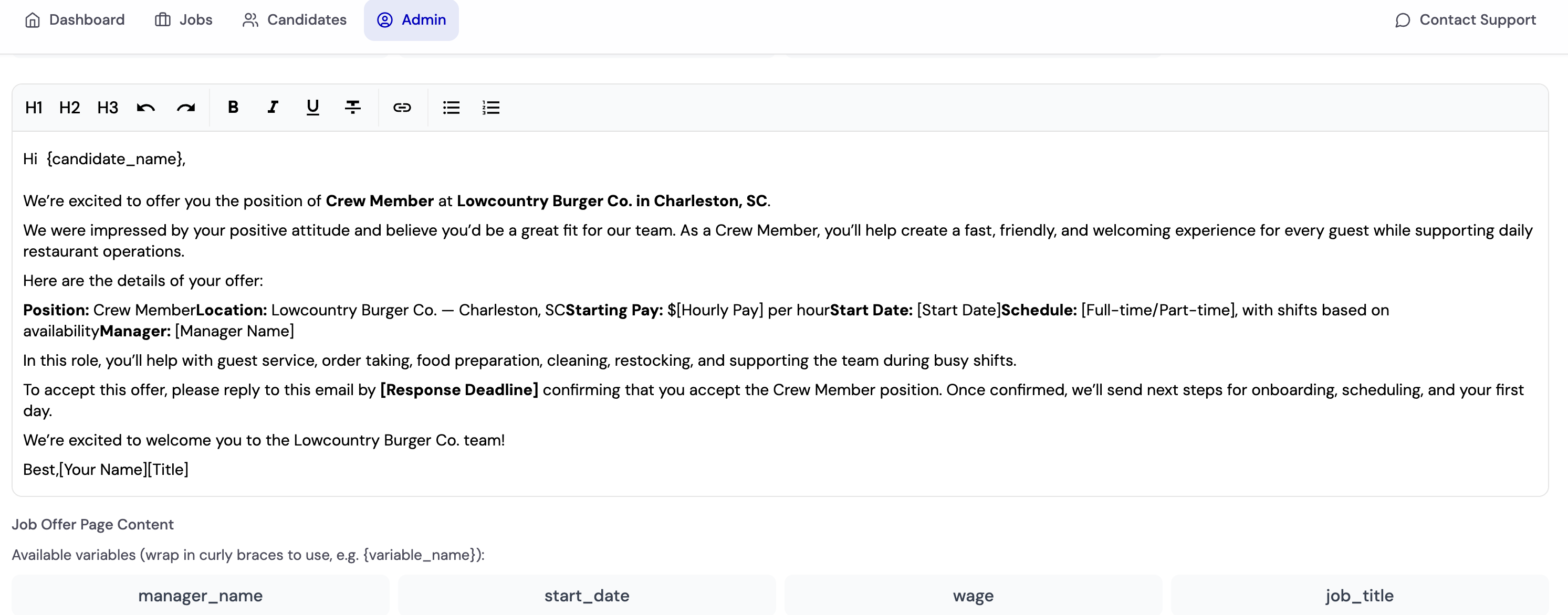
Box 1: Initial email/text message — This is the message sent to the applicant when the offer is shared. Include a clear note that their offer is ready and that they should use the included link to view and sign their offer letter.
Box 2: Full offer letter — This is the page applicants see after clicking the link from the initial message. Add the full offer letter content here, including role details, pay, start date, manager information, expectations, and any required signature language.
Box 3: Post-sign message — This is the confirmation message applicants see after signing the offer letter. Use this space to thank them, confirm the offer was submitted, and explain what happens next.
Use available variables such as candidate name
Use available variables such as candidate name, manager name, job title, wage, and start date.
Save the template
Save the template.
Apply the job offer template to a job
After the offer template is saved, assign it to the job or jobs where it should be available. A job can have multiple offer templates assigned when different offer versions are needed, such as different roles, wage types, locations, or offer scenarios.
Assign templates to the job — Select the job and choose the offer template or templates that should be available for that posting.
Add multiple templates when needed — Multiple templates can be tied to one job so managers can choose the right offer version when sending an offer to a candidate.
Set the primary template — If more than one template is assigned to a job, choose one as the primary template. The primary template should be the default offer version used most often for that job.
What to check before you move on
- ✓The job offer template is saved successfully.
- ✓The initial message, full offer letter, and post-sign message are complete.
- ✓The offer template is assigned to the correct job or jobs.
- ✓If multiple templates are assigned to one job, the correct primary template is selected.