![Sprockets-Logo-Icon.png]](https://hiring.sprockets.ai/hs-fs/hubfs/Sprockets-Logo-Icon.png?height=40&name=Sprockets-Logo-Icon.png)
With ZippyApp, You Can Create an Automated Message to Send to Your Applicants
What this article covers
- How Sprockets works with ZippyApp.
- Where to add or send the Sprockets survey link.
- How to confirm applicants can move through your hiring workflow.
How to Create a Sprockets Automated Message Template Within ZippyApp
- Log in to ZippyApp.


- Fill out the Customer Employer Message box. We suggest the following language:
“We have received your job application!
As part of the interview process, we ask that you please complete a brief, three-question survey. You can access the survey by clicking this link: [Insert Sprockets Link].
We really appreciate you taking the time to consider us in your job search. Please complete the survey, and we'll be reviewing the information you've provided us.
Thank you!” - Don't forget to save your message template!
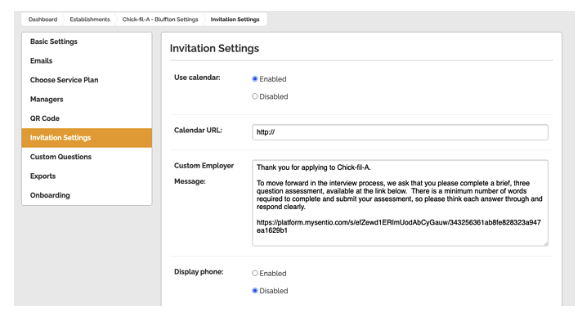
How the Sprockets Message Template Delivers with ZippyApp
Once an applicant submits their application via ZippyApp, they will immediately receive the Sprockets survey (via the Customer Employer Message template) to the email they provided on their application.
Need help?
If you are unsure which link, source ID, or setup option to use, contact your Sprockets support team before updating live applicant workflows.